
Sumup API key guide
How to Locate Your SumUp API Key and Merchant ID
Step 1: Log In to the SumUp Developer Dashboard
Step 2: Navigate to the Settings Section
1. Once logged in, click on 'Account' in the top navigation menu.
2. Select 'Settings' from the dropdown menu.
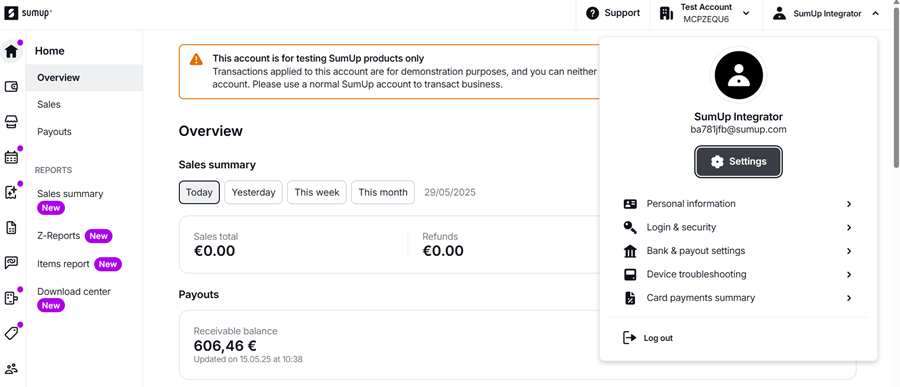
Step 3: Navigate to the For developers – Toolkit section
1. Select 'Toolkit'.

Step 4: Navigate to the API Keys section
1. Select 'API Keys'.

Step 5: Generate or View Your API Key
1. In the API Keys section, you can view existing keys or generate a new one by clicking on 'Create'.
2. Provide a name for your API key and assign the necessary permissions.
3. Click 'Save' to generate the key.
4. Copy the generated API key and store it securely.

Step 5: Locate Your Merchant ID
1. While still in the dashboard, click on 'Account' in the top navigation menu.
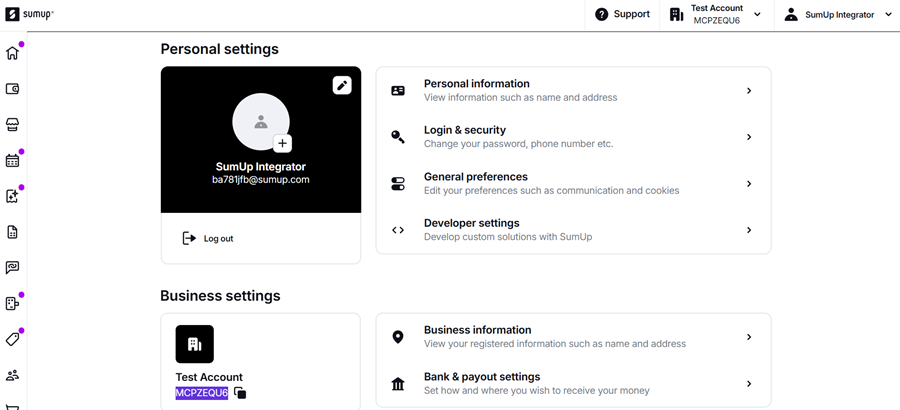
2. Select 'Settings' from the dropdown menu.
3. Your Merchant ID will be listed under your account details and also on the top right corner under your account name.
No Comments