
Barion API key guide
How to Locate Your Barion API Keys
Step 1: Log In to the Barion Dashboard
Go to https://secure.barion.com and sign in with your merchant credentials.
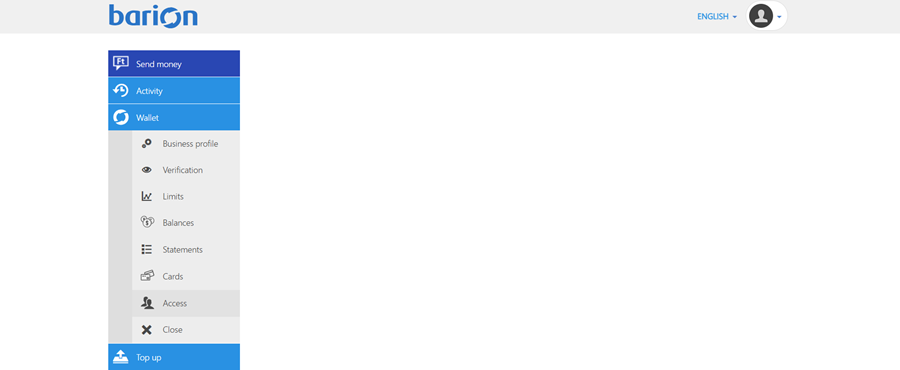
Step 2: Go to the 'Wallet - Access' Section
Once you're logged in:
1. Click on 'Wallet' in the left-hand sidebar.
2. Then click on 'Access'.
Step 3: View Your API Keys
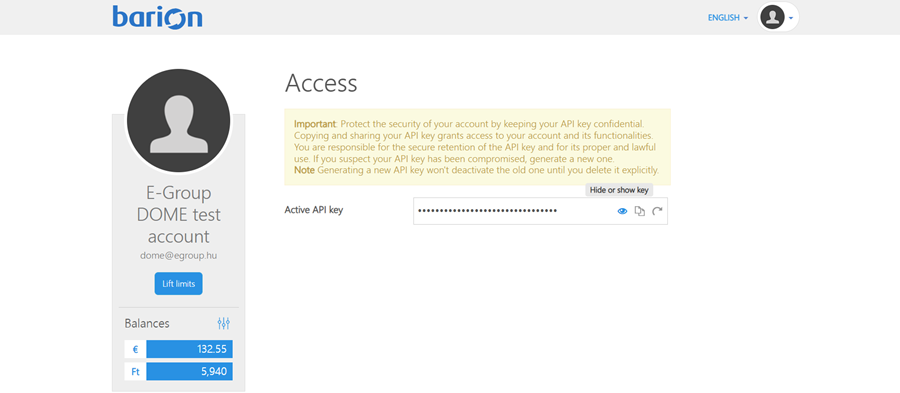
In the Access section, you will see your Active API Key.
To reveal the Active API Key, click on 'Hide or show key'.
Security Tips
- Never expose your secret key in client-side code (like HTML or JavaScript).
- Use environment variables to store keys securely.
- If a key is compromised, rotate it immediately via the dashboard.
For official documentation, visit: https://docs.barion.com/Barion_Shop_Authentication
No Comments