
Navigating and actions on the Tender Dashboard ( Provider )
WARNING: Outdated Layout in the image
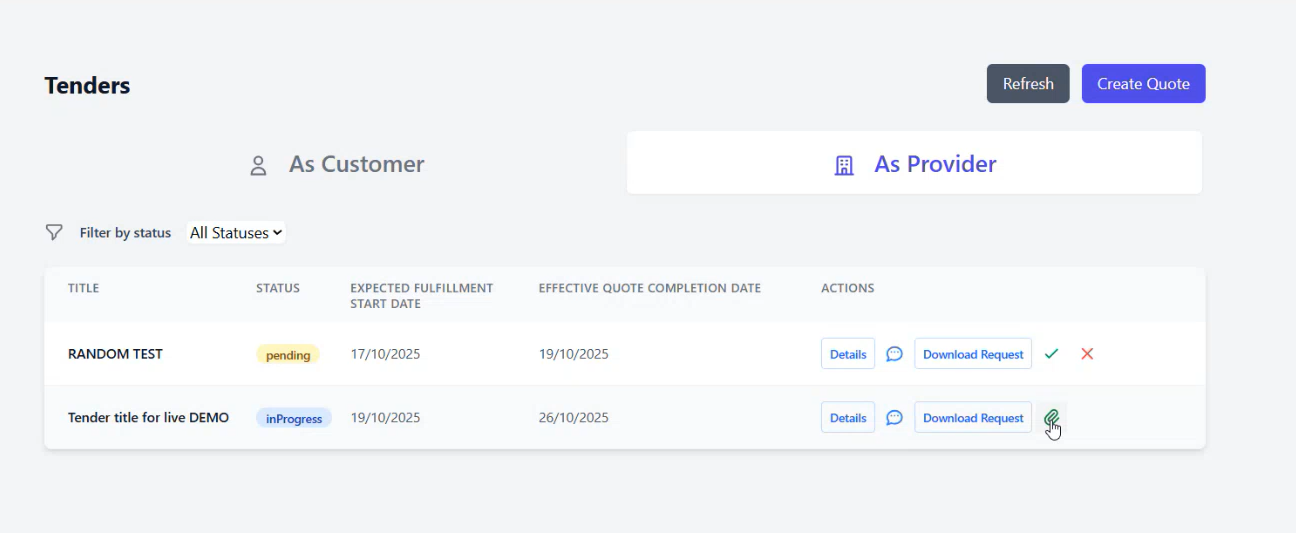
On the provider side, only singular quotes are showed.
The title of the quote is the Title of the Tender.
From the download request button, the provider can download and see the PDF request that the customer has uploaded on the tender.
When a Quote is in pending and the Tender status is still in Pre-Launched, the provider can decide to accept the invitation or decline it, using the Green Checkmark or the Red Cross.
This will move the quote to either status inProgress or Cancelled.
Once the quote is in progress and the Tender status is in Launched, the provider can then upload a PDF proposal to the quote for the evaluation from the customer.
From this moment on, the provider can only wait on the action of the custoemer to further the process.
For more specific informations on the quote system management, you can refer to the guide here Provider Guide Quote Management