
2. Integration Steps
Prerequisites
-
The legal entity has completed onboarding in the DOME ecosystem.
-
The LEAR has obtained a valid LEAR Credential through the Issuer service.
-
The end user (employee, contractor, etc.) has received a Verifiable Credential issued by the LEAR of their organization.
-
DID method supported:
did:key. -
Access to developer documentation and environment URLs (Verifier Authorization Server and APIs).
Step 1 – User credential issuance
The organization’s LEAR uses the Issuer service to issue a Verifiable Credential to the employee or user who will log in through the public client.
-
The credential is bound to the user’s DID.
-
It includes roles or permissions within the organization.
-
The credential is stored in the user’s Wallet application, which can later present it during authentication.
Outcome:
User holds a valid LEAR Credential stored in their wallet and ready to be presented during the login process.
Step 2 – Client configuration
Client type: Public (web or mobile app).
- Obtain and store the assigned
client_id,which can be a did:key or a unique identifier. - Register the
redirect_uri. -
Implement PKCE support (
code_challenge/code_verifier) to protect the authorization code exchange. -
Ensure secure handling of redirects and state parameters.
Outcome:
Public client is configured and ready to initiate the OAuth 2.1 Authorization Code Flow with PKCE.
Step 3 - Registering to the Verifier (Trusted Services List)
The relying party must be registered in the Trusted Services List. The data must match with your client's configuration (see step 2).
|
Field |
Description |
|
clientId |
Should be a did:key or a unique identifier for your client. |
|
url |
The base URL of your service or application. |
|
redirectUris |
Must include all the URLs where you expect to receive authentication responses. |
|
scopes |
Currently, only openid_learcredential is accepted. This scope allows your service to request the necessary credentials. |
|
clientAuthenticationMethods |
Must be set to ["none"] |
|
authorizationGrantTypes |
Must be set to ["authorization_code"] and ["refresh_token"] if needed. |
|
postLogoutRedirectUris |
Include URLs where users should be redirected after they log out from your service. |
|
requireAuthorizationConsent |
Set to false. |
|
requireProofKey |
Set to true to force PKCE. |
|
jwkSetUrl |
Leave it blank. |
|
tokenEndpointAuthenticationSigningAlgorithm |
Must be set to ES256, as this is the only supported algorithm. |
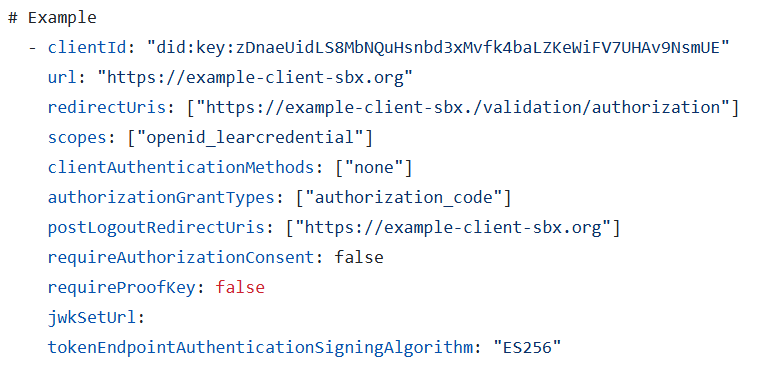
Step 4 – Authorization request
The public client initiates the authentication process by redirecting the user to the Verifier’s Authorization Endpoint, including the required parameters (which have to match the ones of the client configuration):
-
client_id -
redirect_uri -
response_type=code -
scope =openid learcredential -
state: random string -
nonce: random string (this will be added in the ID token, so it is recommended if you rely on the ID token) -
code_challenge(derived fromcode_verifier) -
code_challenge_method=S256
Non-normative example:
| GET /oidc/auth? client_id=did:key:zDnaeUidLS8MbNQuHsnbd3xMvfk4baLZKeWiFV7UHAv9NsmUE &redirect_uri=https%3A%2F%2Fapp.client.org%2F &response_type=code &scope=openid%20eidas &nonce=1234567890abcdef1234567890abcdefXYZabc &state=1234abcd5678efgh9012ijkl3456mnop7890qrst &code_challenge=AbCdEfGhIjKlMnOpQrStUvWxYz1234567890abcdEfGhI &code_challenge_method=S256 Host: authserver.example.org |
Outcome:
User is redirected to the Verifier login screen and authenticates using their Wallet and Verifiable Credential.
Step 5 – Authorization response
After successful authentication and consent, the Authorization Server redirects the user back to the client with the authorization code and state.
Non-normative example:
| HTTP/1.1 302 Found Location: https://app.client.org/? code=A1b2C3d4E5f6G7h8I9j0K1l2M3n4O5p6Q7r8S9t0U1v2W3x4Y5z6 &state=1234abcd5678efgh9012ijkl3456mnop7890qrst |
Outcome:
The public client receives the authorization code and verifies that the returned state matches the one it initially sent.
Step 6 – Token request
The client exchanges the received authorization code for tokens by calling the Token Endpoint.
This request must include the original code_verifier used to generate the challenge.
Non-normative example:
|
POST /oauth2/token HTTP/1.1 { |
Outcome:
The Verifier validates the code and code_verifier and issues an access token and ID token.
Step 7 – Token response
Non-normative example:
|
HTTP/1.1 200 OK { |
Outcome:
-
access_tokenis used to call protected APIs on the Verifier. -
id_tokenidentifies the authenticated user. -
Tokens have a limited lifetime (typically 1 hour).
Step 7 – Use access token
The public client includes the access token in the Authorization header when calling Verifier-protected APIs:
The Verifier validates the token, checks its signature and expiration, and grants access to the requested resources.
Pitfalls to avoid
-
Mismatch between
client_idorredirect_uriin request and registration. -
Missing or incorrect
code_verifier/code_challenge. -
Using a weak or predictable
statevalue (CSRF risk). -
Reusing authorization codes.
-
Not handling token expiration and refresh flow.
-
Forgetting to set
Cache-Control: no-storein responses.