Verifiable Credentials overview
- Introduction - Verifiable Credentials in the DOME Ecosystem
- Verifiable Credential types
- LEAR Credential powers
- eIDAS Trust Framework and digital signatures
- Signing the LEAR Credential
Introduction - Verifiable Credentials in the DOME Ecosystem
Verifiable Credentials are used in the DOME ecosystem as a trusted mechanism for identity, authentication, and authorization.
They ensure that both individuals and services can interact securely across the different DOME components — such as the Issuer, the Marketplace, and external integrations — while maintaining verifiable trust and data integrity.
Credential Issuance and Management
Credentials are issued through the Issuer application and retrieved and stored in the Wallet application.
When a new company joins the DOME ecosystem, it must complete the onboarding process, which concludes with the issuance of a LEAR Credential Employee for the company’s Legal Representative (LEAR). This credential acts as the company’s primary identity within DOME and grants the holder the authority to create and manage additional credentials for employees or services using the Issuer.
If you are a non-LEAR employee, the LEAR of your organization can issue a Verifiable Credential on your behalf.
Once your credential has been issued, you can retrieve it by following these steps.
Verifiable Credential types
Currently, 3 different types of Verifiable Credentials are used in the DOME ecosystem: LEARCredentialEmployee, LEARCredentialMachine and Gx:LabelCredential.
LEAR Credentials are used to identify either an individual or a machine/service. Each LEAR Credential usually includes a credential subject section containing 3 key fields):
-
Mandatee: the entity being identified (person or machine).
-
Mandator: the organization represented by, and granting authority to, the mandatee.
- Power: see the specific guide
The only exception is Gx:LabelCredential type (see below), which has a different credential subject structure.
LEAR Credential Employee
Identifies an individual and is mainly used to log in to the public applications within the ecosystem. Different applications require different powers (permission sets) to grant access to specific features. For example, the Issuer requires the "Onboarding - Execute" power, while the Marketplace allows login with either "Onboarding - Execute" (admins) or "Product Offering" powers (non-admins). For more details, see:
LEAR Credential Machine
Iidentifies a machine or service and is used for M2M authentication flows. For more details, see:
Gx:Label Credential
Used to certify products in the DOME Marketplace. For more details, see:
LEAR Credential powers
LEAR Credentials (LEAR Credential Employee and LEAR Credential Machine credentials) grant specific permissions known as “powers.”
Each power combines a function (the logical area of capability) with one or more actions (the specific operations permitted within that area).
For instance, the power “Onboarding – Execute” authorizes its holder to perform onboarding-related processes within the ecosystem.
Depending on the credential type, the same power may be exercised by a human user (LEAR Credential Employee) or by a backend service (LEAR Credential Machine).
"Onboarding" function
"Execute" action
-Allows the execution of the onboarding process for an organization, including the initial registration. This power is reserved to holders of a LEAR Credential (Employee or Machine) who formally represent the organization in DOME.
-A LEAR Credential Employee with this power allows to login to the Issuer UI and to issue credentials for other employees. Check the login guide.
-A LEAR Credential Machine with this power allows to perform the M2M authentication process. See the Verifier integration guides.
"Product Offering" function
"Create" action
"Update" action
-Grants the ability to modify an existing Product Offering (e.g., description, pricing, or availability). Commonly assigned to Employee Credentials with operational management roles.
"Delete" action
-Enables deletion of an existing Product Offering. As this action has business impact, it is usually restricted to formal representatives or administrators.
"Certification" function
"Attest" action
- Authorizes the attestation (verification or validation) of information, ensuring authenticity and integrity of the data. This power is associated with credentials that have extended authority over certifications. Holders can issue Gx:Label:Credential (currently not available, coming soon).
- A LEAR Credential Employee or LEAR Credential Machine with this power can be used to issue a Gx:Label:Credential
"Upload" action
- Allows the upload or publication of Verifiable Credentials containing certified information. Used to certify a product within the DOME Marketplace using a Gx:Label:Credential.
- A LEAR Credential Employee or LEAR Credential Machine with this power can be used to upload a Gx:Label:Credential to certify a product in the DOME Marketplace.
eIDAS Trust Framework and digital signatures
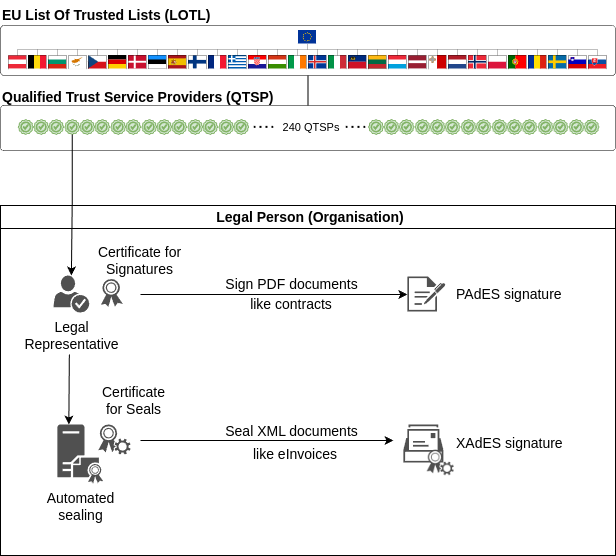
At the top of the Trust Framework we have the EU Trusted Lists. Member States have the obligation to establish, maintain and publish trusted lists with each qualified trust service provider under their control and the services provided by them.
In order to allow access to the trusted lists of all Member States, the Commission makes available to the public the trusted lists as notified by Member States.
Certificates for signatures and for seals are provided by QTSPs under the eIDAS legal framework. There are some 240 QTSPs, providing different Trust Services.
We focus here only on two types of certificates provided by QTSPs to organisations and legal representatives of organisations:
- qualified certificate for electronic seal
- An electronic seal is data in electronic form, which is attached to or logically associated with other data in electronic form to ensure the latter's origin and integrity, where the creator of a seal is a legal person (unlike the electronic signature that is issued by a natural person). In this document we will informally refer to a legal person as an
organisation, when we do not require the more precise terminology.In this purpose, electronic seals might serve as evidence that an electronic document was issued by a legal person, ensuring certainty of the document's origin and integrity. Nevertheless, across the European Union, when a transaction requires a qualified electronic seal from a legal person, a qualified electronic signature from the authorised representative of the legal person is equally acceptable.
- qualified certificate for electronic signature
- An electronic signature is data in electronic form which is attached to or logically associated with other data in electronic form and which is used by the signatory to sign, where the signatory is a natural person.
Like its handwritten counterpart in the offline world, an electronic signature can be used, for instance, to electronically indicate that the signatory has written the document, agreed with the content of the document, or that the signatory was present as a witness.
We are interested here in a qualified certificate for electronic signature issued to a natural person who is an authorised representative of the legal person, informally called a certificate of representation, because it is typically used by the legal representative to sign documents on behalf of the organisation that the natural person represents.
In case you want to seal a document as a legal person (e.g. as a business or organisation), you might be instead interested in an electronic seal.
The qualified certificate for electronic seal is typically installed in a server (using a hardware security module, or HSM) and used to automatically seal documents like eInvoices (typically in XML format), by automated backend processes.
The qualified certificate for electronic signature is used by the natural person who is an authorised representative of the legal person. It is used under the control of the natural person to sign documents typically in PDF format, like contracts, where the natural person acts on behalf of the organisation.
These concepts are described in the following diagram:
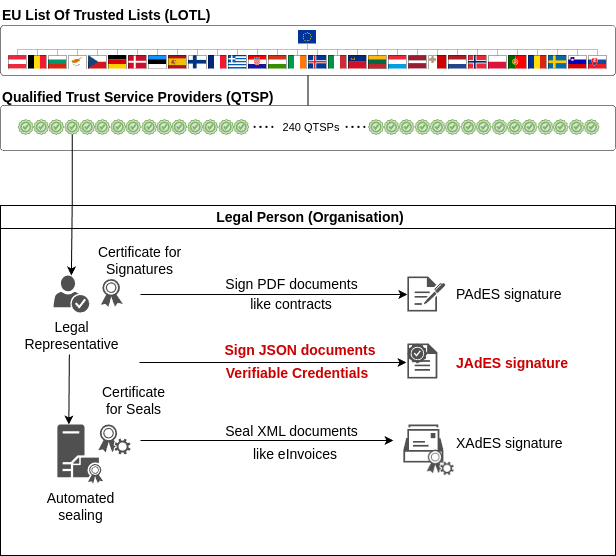
In DOME we use eIDAS certificates to sign/seal Verifiable Credentials, which are JSON documents. Verifiable Credentials represent several types of documents in structured format and be machine readable and machine verifiable. Advanced/qualified signatures provide the same legal validity as 'traditional' PDF or XML documents.
This is represented in the following diagram, complementing the one above:
Signing the LEAR Credential
We start describing at a high level a typical local signature process when the legal representative signs a PDF document, because it is very familiar and will serve as the base to describe the signature of a Verifiable Credential to generate the LEAR Credential, highlighting the similarities and differences.
An imaginary (but typical) PDF signing process goes like this:
- Somebody in another department of the company prepares a PDF document with the appropriate content. If it is a document related to an employee, it may be the HR department the one that prepares a Word document including some relevant employee information.
- The HR department sends to the employee the Word document so the employee can complete the document with some information that the HR department did not have. The employee returns the document to the HR department.
- The HR department exports the Word document to PDF format and sends the file electronically to the legal representative for signature. It may be sent by email, or in more sophisticated companies the document is managed by a document processing system, and it is made available for signature according to a specified workflow.
- The legal representative opens the PDF document in Acrobat Reader or any other application capable of signing PDFs.
- The legal representative instructs Acrobat Reader to digitally sign the document, and the program uses the corresponding operating system APIs to access the keyring or filesystem where the certificate is stored securely. Normally, this requires the legal representative to authenticate with the keyring.
- Acrobat Reader reads the certificate and its associated private key and performs the signature. Acrobat Reader then asks the legal representative to save the signed file.
- The legal representative sends the signed PDF back to HR, so they can provide the document to the employee, together with whatever instructions are appropriate.
When creating the LEAR Credential, the flow is very similar:
- Somebody in another department of the company prepares a JSON document with the format of a Verifiable Credential, with the appropriate content. In the case of a LEAR Credential, it may be the HR department the one that prepares the JSON document, including the relevant employee information. The HR department uses a special program called Credential Issuer to generate this version of the Credential and interact with the employee Wallet. The company can implement its own Issuer if they want, or they can simply use the Issuer provided by DOME As-A-Service.
- The HR department, using the Credential Issuer, sends the Credential to the employee Wallet. The employee can use any Wallet complying with the EDIW standards (OpenID4VCI), including the one provided by DOME. The Wallet, following the OpenID4VCI protocol, generates a pair of private/public keys and sends back the Credential and the public key to HR (again, following the OpenID4VCI protocol). The private key remains always in control of the user and nobody else knows about it.
- The Credential Issuer notifies automatically to the legal person that there is a document to be signed.
- The legal representative opens a local program installed in her computer (the equivalent to Acrobat Reader), and reviews the Credential to be signed. This local program is called Credential Signer and is provided by DOME for Windows, Mac and Linux, but the company can develop or buy their own. The Credential Signer uses the APIs of the Credential Issuer to retrieve the Credential to be signed (there may be more than one for different employees).
- The legal representative instructs the Credential Signer to digitally sign the document, and the program uses the corresponding operating system APIs to access the keyring or filesystem where the certificate is stored securely. Normally, this requires the legal representative to authenticate with the keyring.
- The Credential Signer reads the certificate and its associated private key and performs the signature. The resulting file is now a LEAR Credential.
- After confirmation by the legal representative, the Credential Signer sends the LEAR Credential back to the Credential Issuer, which notifies HR and the employee that the Credential is ready. The employee uses her Wallet to retrieve the LEAR Credential from the Credential Issuer, again using the OpenID4VCI protocol.