# How to: open a new request

<span lang="EN-GB">Creating a new ticket within the DOME project's customer support and ticketing platform is a straightforward process that allows customers to swiftly communicate their inquiries or report issues. Customers should follow these steps to initiate a new ticket:</span>

- **<span lang="EN-GB">Login</span>**<span lang="EN-GB">: ensure you are logged into the platform using your credentials. If you're a new user, refer to the "Access and Navigation" section for guidance on account creation.</span>
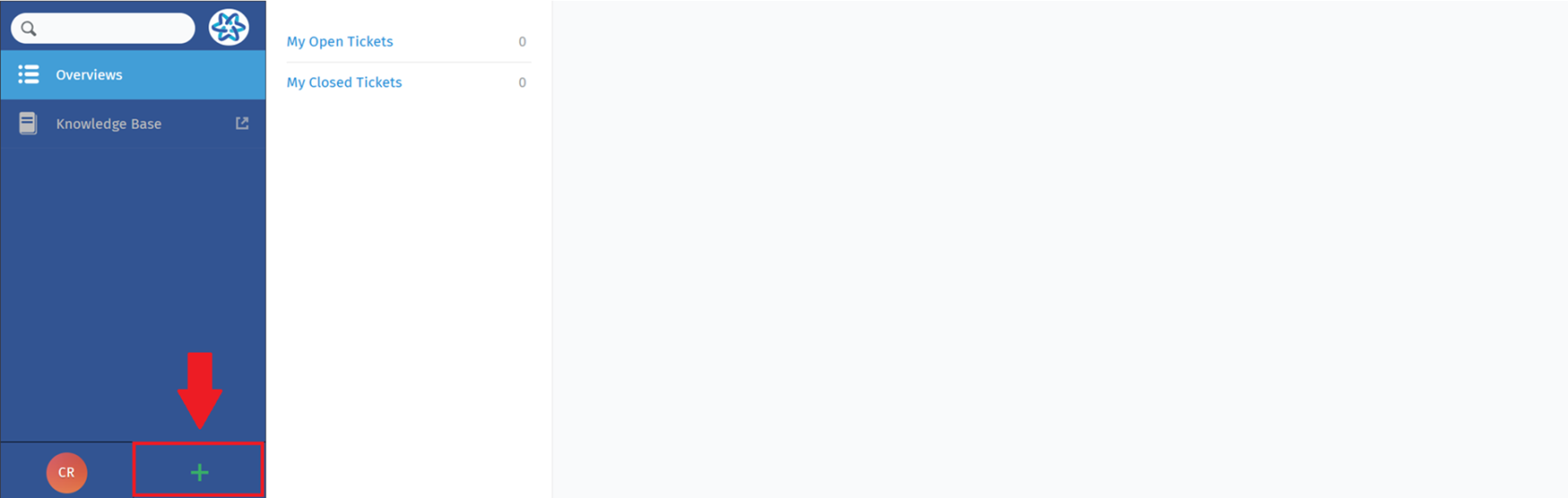
- **<span lang="EN-GB">Navigate to Ticket Creation</span>**<span lang="EN-GB" style="text-indent: -18pt;">: locate and select the "Create New Ticket" option represented by "+" button, accessible from the main navigation menu.</span>

[![image.png](https://knowledgebase.dome-marketplace.eu/uploads/images/gallery/2025-06/scaled-1680-/Ruvimage.png)](https://knowledgebase.dome-marketplace.eu/uploads/images/gallery/2025-06/Ruvimage.png)

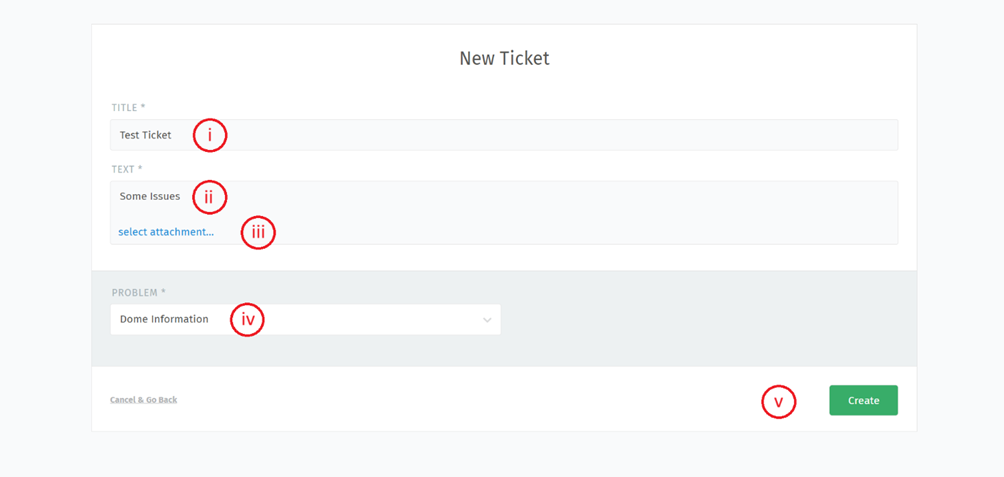
- <span lang="EN-GB" style="text-indent: -18pt;">**Fill in Ticket Details:** complete the required fields, providing detailed information about your request. The process of opening a new ticket involves the customer filling out the following form, indicating in this order:</span><span lang="EN-GB" style="mso-fareast-font-family: Calibri; mso-fareast-theme-font: minor-latin; mso-bidi-font-family: Calibri; mso-bidi-theme-font: minor-latin;"><span style="mso-list: Ignore;">i.<span style="font: 7.0pt 'Times New Roman';"> </span></span></span><span lang="EN-GB">Title.</span>
    
    <span lang="EN-GB" style="mso-fareast-font-family: Calibri; mso-fareast-theme-font: minor-latin; mso-bidi-font-family: Calibri; mso-bidi-theme-font: minor-latin;"><span style="mso-list: Ignore;">ii.<span style="font: 7.0pt 'Times New Roman';"> </span></span></span><span lang="EN-GB">Text (description of the issue).</span>
    
    <span lang="EN-GB" style="mso-fareast-font-family: Calibri; mso-fareast-theme-font: minor-latin; mso-bidi-font-family: Calibri; mso-bidi-theme-font: minor-latin;"><span style="mso-list: Ignore;">iii.<span style="font: 7.0pt 'Times New Roman';"> </span></span></span><span lang="EN-GB">Any attached file or documents.</span>
    
    <span lang="EN-GB" style="mso-fareast-font-family: Calibri; mso-fareast-theme-font: minor-latin; mso-bidi-font-family: Calibri; mso-bidi-theme-font: minor-latin;"><span style="mso-list: Ignore;">iv.<span style="font: 7.0pt 'Times New Roman';"> </span></span></span><span lang="EN-GB">Problem.</span>
    
    <span lang="EN-GB" style="mso-fareast-font-family: Calibri; mso-fareast-theme-font: minor-latin; mso-bidi-font-family: Calibri; mso-bidi-theme-font: minor-latin;"><span style="mso-list: Ignore;">v.<span style="font: 7.0pt 'Times New Roman';"> </span></span></span><span lang="EN-GB">Click on "Create" button.</span>

![](https://knowledgebase.dome-marketplace.eu/uploads/images/gallery/2025-06/embedded-image-m6epv5et.png)

- Upon successful submission, the Customer will receive a confirmation message (via email) and his newly created ticket will be visible within the "My Tickets" section in the "Overviews" Dashboard reachable from main page.

<span lang="EN-US" style="mso-ansi-language: EN-US;">By following these steps, the process ensure that any concern is promptly addressed of the support team. For this reason, it is important that the customer, during the ticket creation phase, fills out the fields correctly.</span>