# Stripe API key guide
How to Locate Your Stripe API Keys
# Step 1: Log In to the Stripe Dashboard
Go to https://dashboard.stripe.com/login and sign in with your merchant credentials.
# Step 2: Go to the 'Developers' Section
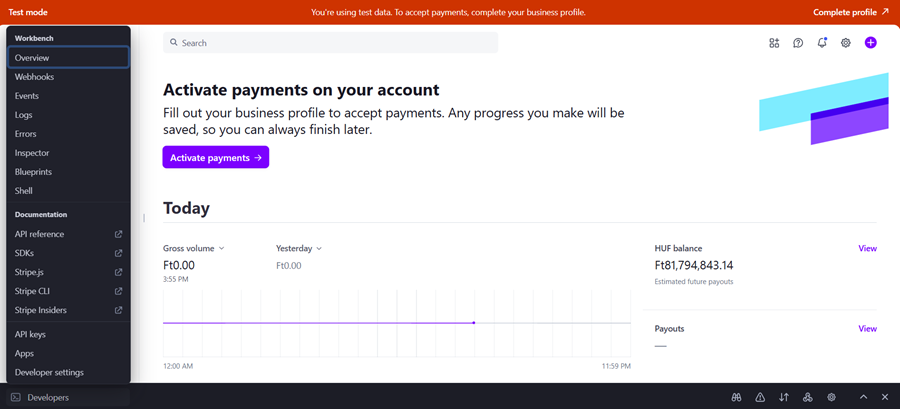
Once you're logged in:
1\. Click on 'Developers' in the left-hand sidebar.
2\. Then click on 'API keys'.
[](https://knowledgebase.dome-marketplace.eu/uploads/images/gallery/2025-12/IGyimage.png)
# Step 3: View Your API Keys
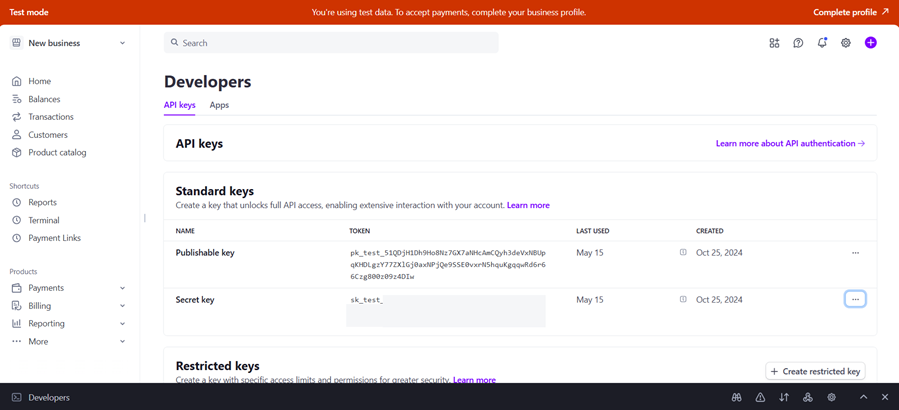
In the API Keys section, you will see:
\- Publishable key (starts with pk\_live\_)
\- Secret key (starts with sk\_live\_) – use this one when connecting your Product Provider profile with your Stripe account in DOME marketplace.
To reveal the Secret key, click on 'Reveal live key token'. It will only be shown once — copy and store it securely.
[](https://knowledgebase.dome-marketplace.eu/uploads/images/gallery/2025-12/29iimage.png)
# Security Tips
\- Never expose your secret key in client-side code (like HTML or JavaScript).
\- Use environment variables to store keys securely.
\- If a key is compromised, rotate it immediately via the dashboard.
For official documentation, visit: https://docs.stripe.com/keys