Verifier M2M Integration Guide
This guide describes how backend services and machine-operated components can integrate with the Verifier acting as an Authorization Server (AS) in machine-to-machine (M2M) scenarios. It specifies the end-to-end process required to obtain and use OAuth 2.1 access tokens based on the client_credentials grant, where client authentication relies on a Verifiable Presentation (VP) embedding a LEARCredentialMachine. The document explains the prerequisites, client onboarding and registration, secure handling of keys and credentials, construction of the VP and client assertion JWT, token acquisition via the Verifier Token Endpoint, and subsequent use of issued access tokens to call protected APIs. It also highlights security requirements, error handling, observability practices, and common pitfalls to ensure robust and interoperable integration across the ecosystem.
1. Introduction
Purpose and scope
This runbook explains how a backend service or component can integrate with the Verifier as an Authorization Server (AS) in M2M mode. It provides the end-to-end steps needed by developers: from preparing configuration and credentials, to calling the Token Endpoint with a LEARCredentialMachine, to using access tokens to consume protected APIs.
-
Integration of backend services with the Verifier using M2M authentication.
-
Use of LEARCredential inside a Verifiable Presentation (VP) as the client assertion.
-
OAuth 2.1 client_credentials profile with Private Key JWT.
-
Token acquisition and usage for accessing Verifier-protected resources.
-
Security, error handling, observability.
Intended audience
-
Developers building components/services in the ecosystem.
-
Technical integrators responsible for connecting a system to the Verifier.
-
SRE and security engineers validating compliance.
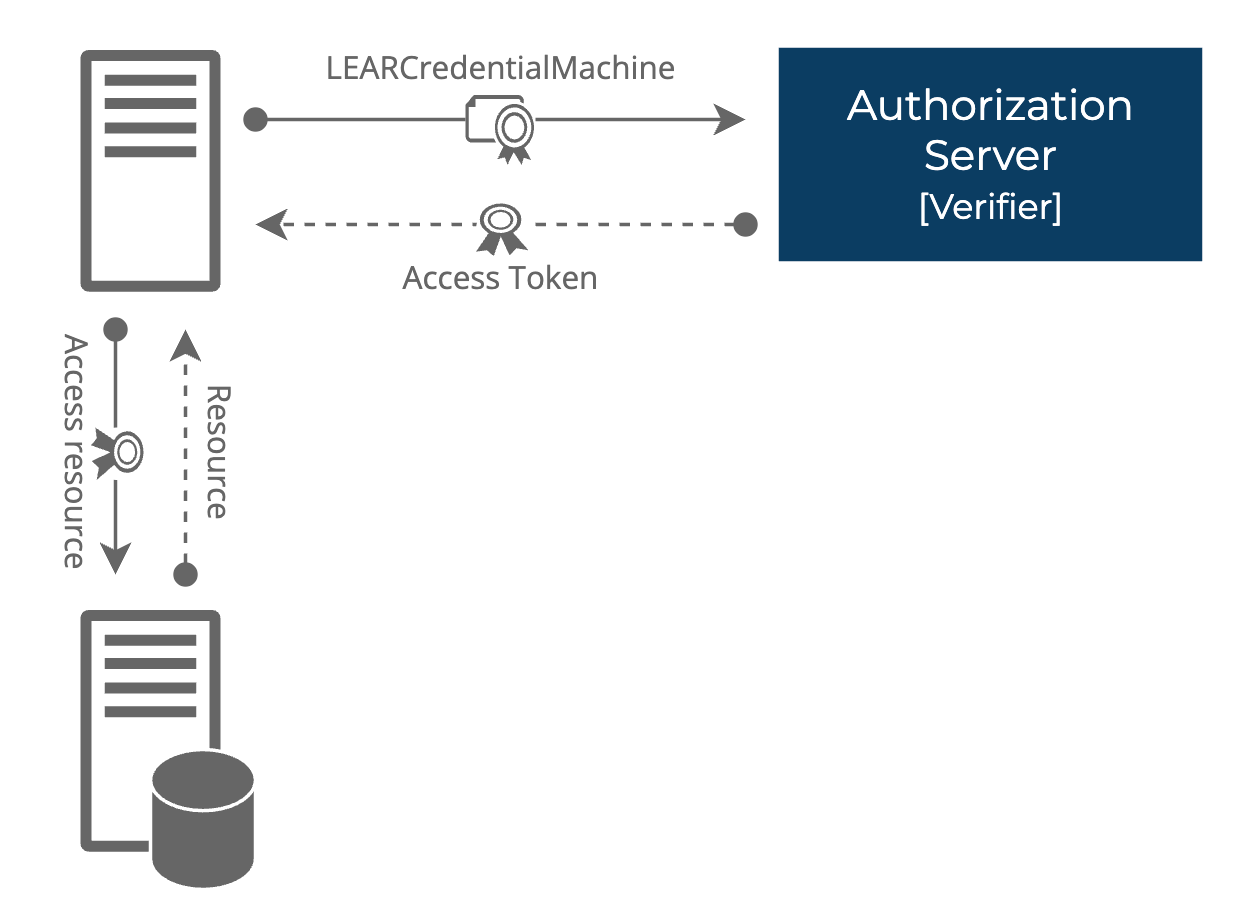
High‑level architecture
-
Client requests access token from Verifier Token Endpoint using client_credentials grant and client_assertion = VP (containing LEARCredentialMachine).
-
Verifier authenticates client, validates VP and LEARCredentialMachine.
-
Verifier issues access token with 1h lifetime.
-
Client uses access token to call protected resources.
High-level flow
-
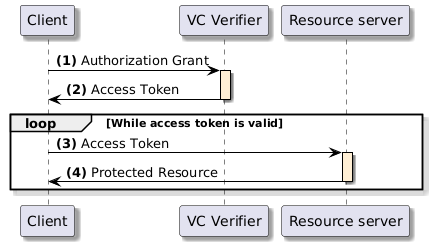
The client requests an access token by authenticating with the authorization server (VCVerifier) and presenting the authorization grant. Since the client authentication is used as the authorization grant, no previous authorization request is needed.
-
The authorization server authenticates the client and validates the authorization grant, and if valid, issues an access token.
-
The client requests the protected resource from the resource server and authenticates by presenting the access token.
-
The resource server validates the access token presented and if valid, returns the resource requested.
2. Integration Steps
Prerequisites
-
Legal entity has completed onboarding in the ecosystem.
-
LEAR can access the Issuer service and issue a LEARCredentialMachine to its machine(s).
-
DID method supported: did:key.
-
Access to developer documentation and test environment URLs.
Step 1 - Machine credential issuance
-
The legal entity accesses the Issuer service and issues a LEARCredentialMachine to its machine.
-
The service generates a key pair that is bound to the LEARCredentialMachine. Keep the Private Key secure.
-
The machine obtains a DID identifier. This DID will act as the client identifier. The DID is the result of using the public key of the key pair in a did:key format.
-
The LEARCredentialMachine is a JWT VC.
-
The process to obtain the LEARCredentialMachine in the LEAR wallet is similar to the other VC issuances.
Outcome: machine holds a valid LEARCredentiaMachine bound to its DID.
Step 2 - Client configuration
-
Client type: confidential.
-
Store LEARCredentialMachine and Private Key securely (Vault, HSM).
Outcome: client is ready to authenticate.
Step 3 - Acquire token
To acquire a token, the client must build a Verifiable Presentation (VP) that contains the LEARCredentialMachine (as jwt_vc_json), sign this VP as a JWT with the machine’s private key, embed it inside a client assertion JWT with the required claims, and finally POST a client_credentials request to the Verifier Token Endpoint.
Build the VP JWT (vp_token)
LEARCredentialMachine as a JWT VC string. If it is stored Base64‑encoded, decode it first.
VP object claims:
-
@context
-
type
-
verifiableCredential
Example VP object:
|
{ "@context": ["https://www.w3.org/2018/credentials/v1"], "type": ["VerifiablePresentation"], "verifiableCredential": ["eyJhb...ssw5c"] } |
VP JWT claims (signed with the machine private key):
-
iss = DID of the machine (same as ‘sub’ in LEARCredentialMachine).
-
sub = DID of the machine.
-
aud = Verifier Token Endpoint URL.
-
iat = current time (seconds).
-
nbf = same as iat.
-
exp = short expiry (e.g. iat + 10s).
-
jti = UUID (unique).
-
vp = VP object above.
Example VP JWT payload:
|
{ "iss": "did:key:zDna...", "sub": "did:key:zDna...", "jti": "urn:uuid:3978344f-8596-4c3a-a978-8fcaba3903c5", "aud": "https://verifier.dome-marketplace.eu/token", "nbf": 1541493724, "iat": 1541493724, "exp": 1573029723, "vp": { "@context": ["https://www.w3.org/2018/credentials/v1"], "type": ["VerifiablePresentation"], "verifiableCredential": ["eyJhb...ssw5c"] } } |
Build the client assertion JWT
Claims (profile):
-
iss = DID of the machine.
-
sub = DID of the machine.
-
aud = Verifier Token Endpoint URL (issuer identifier per RFC 8414).
-
jti = UUID v4 (single use).
-
iat = current time in seconds.
-
exp = iat + 10 seconds (short lifetime to prevent replay).
-
vp_token= base64url (unpadded) encoding of the VP JWT string.
Correctness rules:
-
Use NumericDate in seconds for iat/exp.
-
Use base64url per RFC 7515 for vp_token, not standard Base64.
-
Do not include presentation_submission.
-
Sign with machine private key (Header: alg = ES256 or RS256, kid = DID key).
Make the request
-
Endpoint: POST /token
-
Content-Type: application/x-www-form-urlencoded
-
Parameters:
-
grant_type=client_credentials (REQUIRED)
-
client_id=<DID or configured client id> (REQUIRED)
-
client_assertion_type=urn:ietf:params:oauth:client-assertion-type:jwt-bearer (REQUIRED)
-
client_assertion=<JWT> (REQUIRED)
|
POST /token HTTP/1.1 Host: verifier.dome-marketplace.eu Content-Type: application/x-www-form-urlencoded grant_type=client_credentials& client_assertion_type=urn%3Aietf%3Aparams%3Aoauth%3Aclient-assertion-type%3Ajwt-bearer& client_assertion=eyJhbGciOiJSUzI1NiIsImtpZCI6IjIyIn0...<snip> |
Obtain the response
If the request is valid, the Verifier issues an access token:
|
{ "access_token": "eyJraWQiOiJkaWQ6a2V5OnpEb...k9aYcDBWcGww", "token_type": "Bearer", "expires_in": 3600 } |
-
Cache-Control: no-store must be included in the response.
-
Refresh tokens are not supported.
Format of the access_token:
|
{ "kid": "did:key:zDnaekiwkWcXnHaW6au3BpmfWfrtVTJZrA3EHgLvcbm6EZnup", "typ": "JWT", "alg": "ES256" } |
|
{ "iss": "https://verifier.dome-marketplace.eu", "aud": "https://verifier.dome-marketplace.eu, "sub": "did:key:zDnaerQi587EqQLqEaj7qbxc46hzdjX2goNsmLTq1X6HqzzjP", "exp": 1745408685, "iat": 1745405085, "jti": "1700c742-5457-4c02-8e6f-020a94054519", "client_id": "https://verifier.dome-marketplace.eu" "scope": "machine learcredential", "vc": { "@context": [ "https://www.w3.org/ns/credentials/v2", "https://dome-marketplace.eu/.well-known/credentials/lear_credential_machine/w3c/v2" ], "type": [ "VerifiableCredential", "LEARCredentialMachine" ], "issuer": { "id": "did:elsi:VATES-A12345678", "organization": "TRUST SERVICES, S.L." , "country" : "ES", "commonName" : "TRUST SERVICE ELECTRONIC SEAL FOR VERIFIABLE CREDENTIALS", "serialNumber": "610dde5a0000000003" }, "credentialSubject": { "mandate": { "mandator": { "id": "did:elsi:VATFR-B12345678", "organizationIdentifier": "VATFR-B12345678", "organization": "GOOD AIR, S.L.", "country": "FR", "commonName": "JEAN MARTIN - CNI 880692310285", "serialNumber": "880692310285", "email": "jean.martin@goodair.fr" }, "mandatee": { "id": "did:key:zDnaey7ZcQ1gfXxaZSYffjvhrrFtd7PQdQtJpofzRJNCwydHL", "domain": "dpas.goodair.fr", "ipAddress": "195.70.63.244" }, "power": [{ "type": "domain", "domain": "DOME", "function": "Onboarding", "action": ["Execute"] }] } }, "validFrom": "2025-09-15T06:11:19.802230162Z", "validUntil": "2026-09-15T06:11:19.802230162Z", "credentialStatus": { "id": "https://issuer.dome-marketplace.eu/credentials/status/1#urn:uuid:68422e47-5d69-4e0b-8a49-34990f2f76a, "type": "PlainListEntity", "statusPurpose": "revocation", "statusListIndex": "urn:uuid:68422e47-5d69-4e0b-8a49-34990f2f76a2", "statusListCredential": "https://issuer.dome-marketplace.eu/credentials/status/1" } } } |
Pitfalls to avoid
-
Milliseconds vs seconds in time claims.
-
Using Base64 instead of Base64URL.
-
Wrong iss/sub values (must be DID).
-
VP with more than one LEARCredentialMachine.
-
Replay attacks: enforce unique ‘jti’ within the expiration window.