Verifier Confidential Client Integration: Authorization Code Flow + client_secret_jwt
Introduction
Purpose and scope
This runbook explains how a confidential client, such as a backend component or secure web application, can integrate with the Verifier acting as an Authorization Server (AS) using the Authorization Code Flow with client_secret_jwt client authentication. It provides a complete view of the flow — from the signed Authorization Request to token acquisition and usage — following OAuth 2.1 best practices.
Main aspects covered include:
-
Integration of confidential clients with the Verifier using Authorization Code Flow +
client_secret_jwt. -
Use of a signed JWT as the client authentication method instead of a static secret.
-
OAuth 2.1 authorization_code profile with
request_uripointing to a signed Authorization Request Object. -
Token acquisition and usage for accessing Verifier-protected APIs.
-
Security, signature validation, error handling, and observability.
Intended audience
-
Developers integrating backend or confidential clients with the Verifier.
-
Technical integrators configuring secure OAuth 2.1 clients.
-
SRE and security engineers auditing token-based authentication.
High-level architecture
-
The confidential client builds and signs an Authorization Request Object (JWT) and hosts it at a
request_uri. -
The client redirects the user to the Verifier Authorization Endpoint, including the
request_uri. -
The Verifier retrieves and validates the signed request object using the client’s public key (
jwks_uri). -
The Verifier authenticates the user and returns an authorization code.
-
The client exchanges the code for tokens using
client_secret_jwtauthentication. -
The Verifier issues access, ID, and refresh tokens.
High-level flow
-
The client creates and signs a JWT containing the Authorization Request parameters, making it available at the provided
request_uri. -
The user is redirected to the Authorization Server, which retrieves and validates the JWT.
-
After successful authentication and consent, the AS issues an authorization code.
-
The client exchanges the code for tokens, authenticating with
client_secret_jwt. -
The AS validates the JWT and issues access, ID, and refresh tokens.
-
The client uses the access token to call protected APIs, and refreshes tokens as needed.
Integration Steps
Prerequisites
-
The legal entity has completed onboarding in the DOME ecosystem.
-
The LEAR has obtained a valid LEARCredentialMachine through the Issuer service.
-
DID method supported:
did:key. -
The client’s private key is securely stored (e.g., in an HSM or vault).
-
Access to developer documentation and environment URLs.
Step 1 – Generating key pair: did:key + private key
You will need a did:key / private-key pair. It can be obtained through different methods. One option we can propose is to use our Issuer: when issuing a LEARCredentialMachine, a key pair is generated for the client. The corresponding did:key is set as the mandatee.id in the credential (which you can check in the details page after issuing it --no need to activate it). The private key must be kept securely on your side and is never shared.
Step 2 – Client configuration
Client type: Confidential.
- Obtain and store the assigned
client_id,which should be the did:key generated in the previous step. -
Ensure the
redirect_uriis pre-registered and uses HTTPS. -
Implement JWT-based client authentication (
client_secret_jwt). You client will need arequest_uriwhere a signed JWT token must be exposed (see the authorization request step).
Outcome:
The confidential client is fully configured to authenticate using signed JWTs and perform the Authorization Code Flow.
Step 3 – Registering to the Verifier (Trusted Services List)
The relying party must be registered in the Trusted Services List. The data must match with your client's configuration (see step 2).
|
Field |
Description |
|
clientId |
Should be a did:key that identifies your client. |
|
url |
The base URL of your service or application. |
|
redirectUris |
Must include all the URLs where you expect to receive authentication responses. |
|
scopes |
Currently, only "openid_learcredential" is accepted. This scope allows your service to request the necessary credentials. |
|
clientAuthenticationMethods |
Must be set to ["client_secret_jwt"] |
|
authorizationGrantTypes |
Must be set to ["authorization_code"] and ["refresh_token"] if needed. |
|
postLogoutRedirectUris |
Include URLs where users should be redirected after they log out from your service. |
|
requireAuthorizationConsent |
Set to false. |
|
requireProofKey |
Set to false. |
|
jwkSetUrl |
Since you're using a did:key for your clientId, you do not need to provide your own jwkSetUrl: the verifier can derive your JWKS directly from the did:key. Just add this string: “<verifier-url>/oidc/did/<your-did-key>”. |
|
tokenEndpointAuthenticationSigningAlgorithm |
Must be set to ES256, as this is the only supported algorithm. |
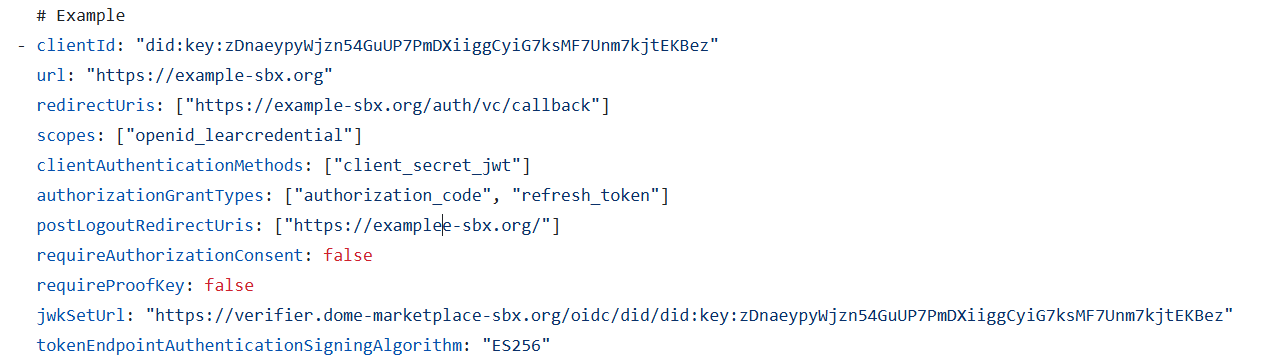
Step 4 – Authorization request
The confidential client starts the authorization process by redirecting the user to the Authorization Endpoint with these parameters :
-
client_id: has to match the one in your client's configuration -
redirect_uri: has to match the one in your client's configuration -
response_type=code scope = openid%20learcredential(use a space between the values, not an underscore)-
state: random string -
nonce: random string (this will be added in the ID token, so it is recommended if you rely on the ID token) request_uri: see the explanation below*
Non-normative example:
*The request_uri. must expose an Authorization Request Object., which is an JWT and must include these parameters. These parameters must match the ones of your client's configuration (and the ones included in the request as well):
client_idscope-
redirect_uri
Step 5 – Authorization response
After the user successfully authenticates and authorizes access, the Authorization Server redirects back to the client’s redirect_uri with an authorization code.
Non-normative example:
Step 6 – Token request
The client exchanges the authorization code for tokens by calling the Token Endpoint.
In this step, the client authenticates using client_secret_jwt, sending a signed JWT in the client_assertion parameter.
Non-normative example:
Non-normative example of a Token Request:
Step 7 – Token response
Non-normative example:
Outcome:
Step 8 – Use access token
The confidential client uses the access_token to call Verifier-protected APIs: